Even when guests tell you there’s an issue (“the fan isn’t working,” “the lock isn’t unlocking”), you never know what they’ve already tried. Step-by-step troubleshooting changes that. The AI guides them through the right steps, notes what worked, and hands the staff a clear summary.
Create a prompt to set up troubleshooting steps.
To get reliable step-by-step troubleshooting, the AI needs a reference to pull from. Write your instructions in a clear sequence and include any details the guest may need (like where a device is located or what lights to look for). The Agent will read this, break it into steps, guide the guest through each one, and log the results. A well-written reference = better fixes and fewer unnecessary escalations.
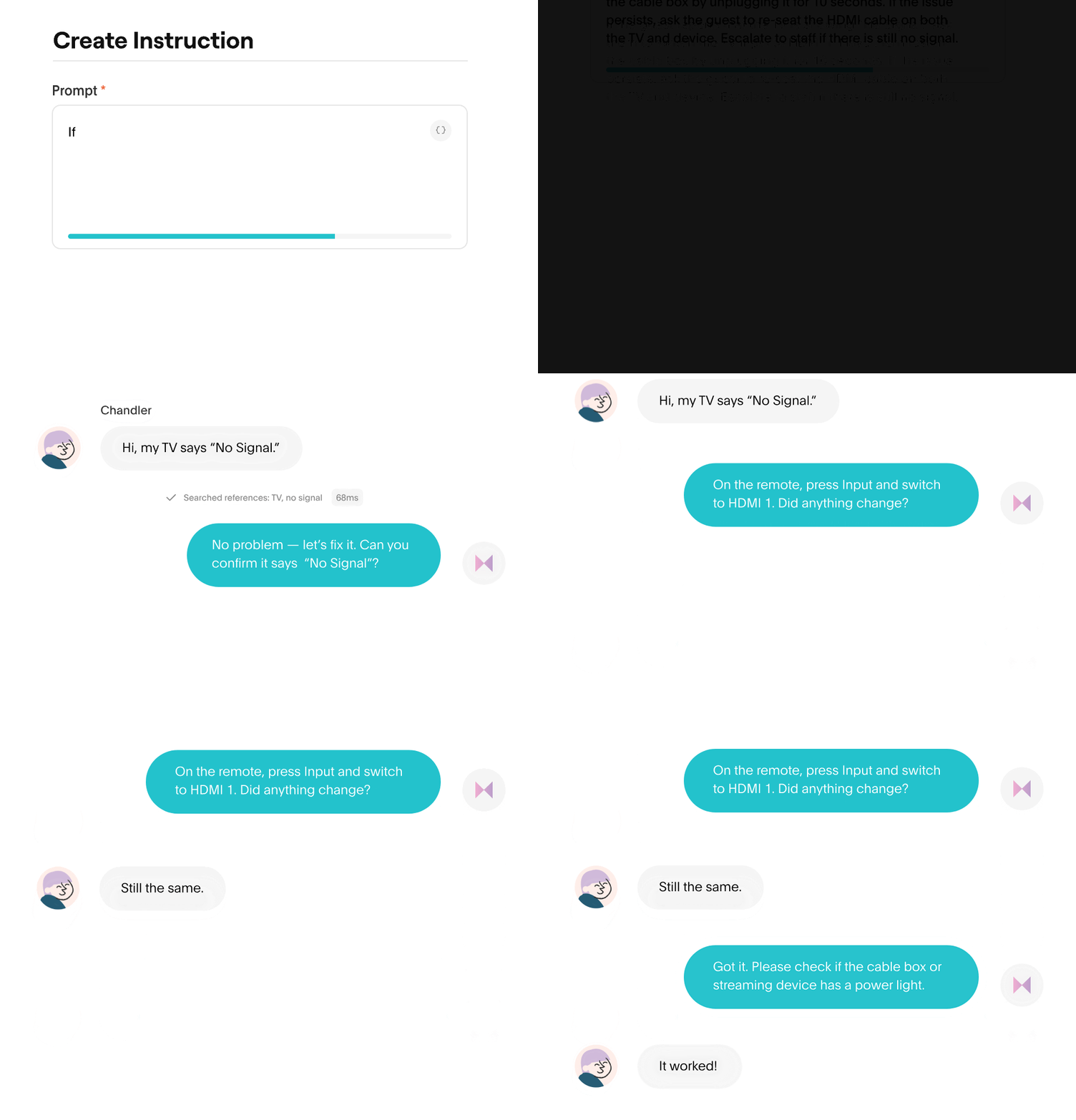
Example: “TV Showing 'No Signal’”
- Ask the guest to confirm the TV is powered on and showing the “No Signal” message.
- Have them press the Input/Source button on the remote and select HDMI 1 (or the input labeled for the cable box/streaming device).
- Ask them to check that the cable box or streaming device has a power light on.
- If not, ask them to unplug the device for 10 seconds and plug it back in.
- If the TV still shows “No Signal,” have the guest gently re-seat the HDMI cable on both ends (TV + device).
- If the issue continues, escalate to staff.
Walking guests through each step at a time.
Instead of dumping a long list of fixes, the AI breaks the reference into simple, conversational steps. It waits for the guest to confirm each one, then decides the next step based on what happened.
Guest: “The light is off.” AI: “Got it — unplug the router for 30 seconds and plug it back in.” Guest: “It’s green now, but still not working.”
The Agent knows to move to the next step and keeps guests from getting overwhelmed, skipping steps, or giving up.
Fewer mistakes and faster resolution
When instructions are sent all at once, guests often do them out of order or miss key details. A step-by-step sequence:
- checks each step before moving on
- keeps guests on track and helps them resolve the issue
Staff instantly see whether the issue is real or a user error
This is one of the biggest operational wins. After a guided sequence, staff know:
- If it was user error (and already fixed)
- If it was a minor issue that needs quick attention
- If something is actually broken
It removes the guesswork staff deal with today, like when someone says “the AC is broken,” but it was set to “fan only.”
Dramatically fewer unnecessary maintenance dispatches.
Maintenance calls can be preventable: an unplugged router, a lock that wasn’t fully unlocked, a thermostat on fan mode, or a TV on the wrong input.
When it's time to step in, staff get the full story.
If the issue still isn’t resolved, it escalates to staff with a full record of the steps the guest has already taken. Staff don’t restart the conversation. They pick up exactly where the guest left off, making the resolution faster and smoother.