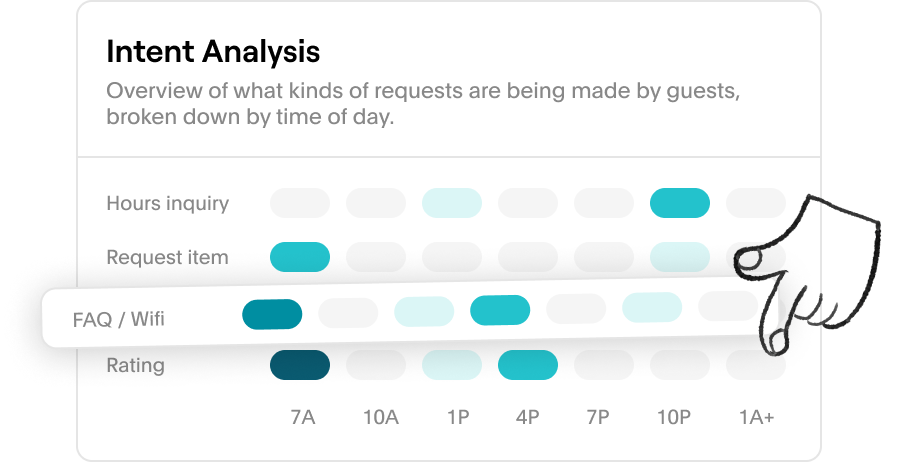
Guests might ask for the same things repeatedly, but without a detailed, consolidated report, these patterns can go unnoticed. Seeing a better view with an Intent-based Heatmap allows you to see exactly what your guests are asking about, such as WiFi details, item requests, amenities, or special services, etc. By breaking down these inquiries by time, you can identify patterns and peak times for certain requests.
Some examples of guest requests:
- Late checkout - Guests often request late checkouts at specific times, which can help you determine the best times to offer this option in the future. Offering late checkouts during peak demand periods can increase revenue as part of the guest journey.
- Dining and room service request - Guests frequently inquire about dining options, indicating a strong interest in available food services. By offering a variety of menu options, you can encourage guests to dine on-site and enhance their overall experience.
- Housekeeping request - Guests may request additional towels or toiletries, revealing preferences for specific amenities. This information can help you stock rooms accordingly and refine housekeeping schedules and inventory management to meet guest needs efficiently.
How to view your Intent-based heatmap
- Navigate to the Analytics tab.
- Scroll to find the Intent Analysis report.
You can also see all your additional reports here such as Activity Heatmap, Guest Ratings, Response Time, Revenue Generated, etc.
Seeing common requests can help you anticipate guest needs and allocate resources more efficiently, ensuring your team is proactive and provides timely assistance. By analyzing these requests and trends, properties can make data-driven decisions to enhance services, improve resource allocation, and create a more personalized experience for guests.